

How AI Agents Work, and How to Start Using Them Today
Agents are different from chatbots. You give them a task, they figure out the steps, open the right apps, do the work, and report back.
I'm sure you've used AI before. You've likely asked ChatGPT a question, or maybe Claude. It's given you an answer and perhaps you've copy pasted the response somewhere. That's more or less a tool.
So what's an agent? Agents are a little different. You should think of them more like an employee. You give it a task, it then goes and figures out the steps, it opens the right apps, does the work and alerts you when it's done. If you don't want to, you don't have to touch anything in between. Sounds neat right?
The distinction between a tool and an employee matters now because agent capability recently passed a practical threshold. They're now good enough to actually run parts of your business.
But how do they actually work and how should your business use them? I've spent a lot of time trialing and digging into agents, so let's cut through the noise.
What can agents actually do?
I want to be specific here because a lot of the hype around agents is hyperbole and it's hard to know what's real and not. Here's a few examples of real workflows that are possible with today's tools and agents.
Timesheets. You run a trade business with 15 workers across different sites. Right now someone in your office calls or texts each worker at the end of the day to get their hours, then manually enters them into your timesheet system. But now using agents, they'll actually call each worker, ask them their clock-on and clock-off times, confirm any other job details and go and fill out the timesheets for you. It's the consistency here that matters. It'll call the same time, every day and not miss a beat. Now nobody in the office needs to spend hours a week entering it.
Client onboarding. When a new customer signs up a team member usually spends 3–4 hours creating project folders, sending welcome emails, updating the internal CRM, maybe scheduling a kickoff call, and granting access to various tools. Now an agent can trigger the entire sequence from a single message in iMessage. It takes fifteen minutes with zero errors, and a strict, consistent experience for every new client.
Morning updates. First thing in the morning before you've had your coffee, an agent pulls yesterday's numbers from all of your systems, summarises overnight emails, flags anything urgent and sends you a message in WhatsApp or Telegram. In one short message you get what you need instead of opening five apps and scrolling through the noise. Want to know more about a specific point? Just ask it.
KPI reporting. Your Monday standup used to require someone spending half a day pulling data from Analytics, ad platforms, CRM, and project management tools. An agent logs into each one, grabs the numbers, builds a summary, and posts it to your team's Slack channel before the meeting starts.
Invoice chasing. The agent checks which invoices are overdue, sends follow-up emails in your tone, and escalates the ones that need a personal phone call. The awkward first chase emails can be completely automated. The relationship-sensitive ones are held back for you to address.
Email triage. An agent scans your inbox every 30 minutes, then categorises by urgency and drafts replies for the routine stuff then sends you a prioritised summary. Early adopters report significant time savings on email processing alone.
And that's just a few examples. But there's also the stuff that sounds like science fiction that's happening today. One business owner's agent called them on the phone with a real voice to brief them on the day ahead. Another's agent handled a multi-day car price negotiation over email while the owner slept. Someone else's filed a legal rebuttal to an insurance denial without being asked.
Agent usage is only going to grow, purely because the economics are simple. Take a five-person team that spends ten hours a week on automatable tasks at $50/hour. That's $6,000 in monthly value against roughly $100 in API costs to run the agent. You don't need a business case more complicated than that. The same economics apply when software becomes cheaper to build and change.
But most business owners I've spoken to have concerns. Security, data sovereignty, reliability and how you even build and maintain these systems, all valid issues. Let's go through how they actually work to address some of these.
How do agents really work?
Most posts I've read go straight to the engagement hyperbole. So here's what happens when you tell an agent to do something, in plain English.
You send a message through whatever you already use. WhatsApp, Slack, Telegram, email, iMessage even through phone calls. The agent receives it. It thinks about what needs to happen, breaking your request into steps. It connects to your tools, your calendar, your email, your CRM, your accounting software, using integrations. Then it executes each step, either browsing like a human does, or through something called CLI (command line interface). It clicks buttons, fills out forms, sends messages, and moves files. It has a memory, so it remembers what you like, how you work, what you've asked before. And it reports back when it's done, or asks you if it hits something it can't decide on its own.
The "brain" is just an interchangeable AI model like Claude Opus or GPT-5.2. The agent is the body, an AI agent harness that lets the brain actually do things in the real world. The model does the thinking and the agent acts. It's like Robocop, human brain (the model), robot body (the harness).
That's it in a nutshell.
The reason agents are now really capable is that two things happened at the same time.
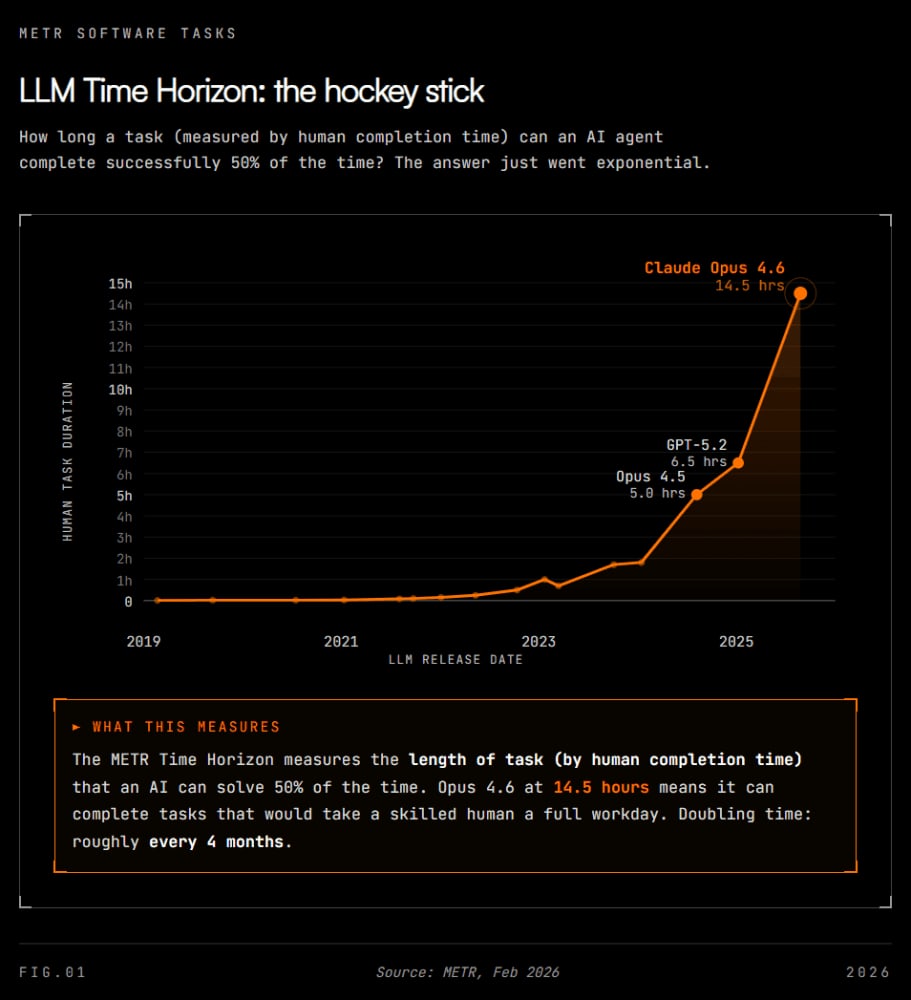
The models got smarter in ways that actually matter. Not just benchmark improvements but practical ones. On METR's Time Horizon benchmark, which measures the length of task (by human completion time) that an AI can solve reliably, Claude Opus 4.6 hit 14.5 hours. Meaning it can now complete software tasks that would take a skilled human professional a full workday. A year ago, the best models topped out at minutes. The jump from near-zero to 14 hours in eighteen months is one of the steepest capability curves in computing history. Those complex multi-step decisions that fell apart halfway through a year ago now complete reliably. The models have moved on from impressive chat demos to production-grade usability.
And the tooling finally caught up. The models were arguably ready before the infrastructure around them was. What changed is that developers have built the harness that unlocks the model capability. Anthropic's Model Context Protocol gave agents a standard way to connect to tools and hit 97 million monthly SDK downloads within a year before being donated to the Linux Foundation in December 2025. Frameworks like CrewAI hit 1.0 and now power over 1.4 billion agentic automations. And OpenClaw made the whole thing accessible through chat interfaces like iMessage, WhatsApp, Telegram and Slack. OpenClaw hit over 180,000 GitHub stars in weeks, and its creator Peter Steinberger was hired by OpenAI in February 2026, with the project moving to an independent open-source foundation. Now with these types of frameworks, if you need an interface to your CRM, you can just ask your agent to build it for you.
Three ways to set this up
But, how secure are these approaches? Where is your data stored? Do you have control? This is where it gets practical. Overall, there's three broad approaches, and which one makes sense depends on your data sensitivity, your technical capability, and your budget.
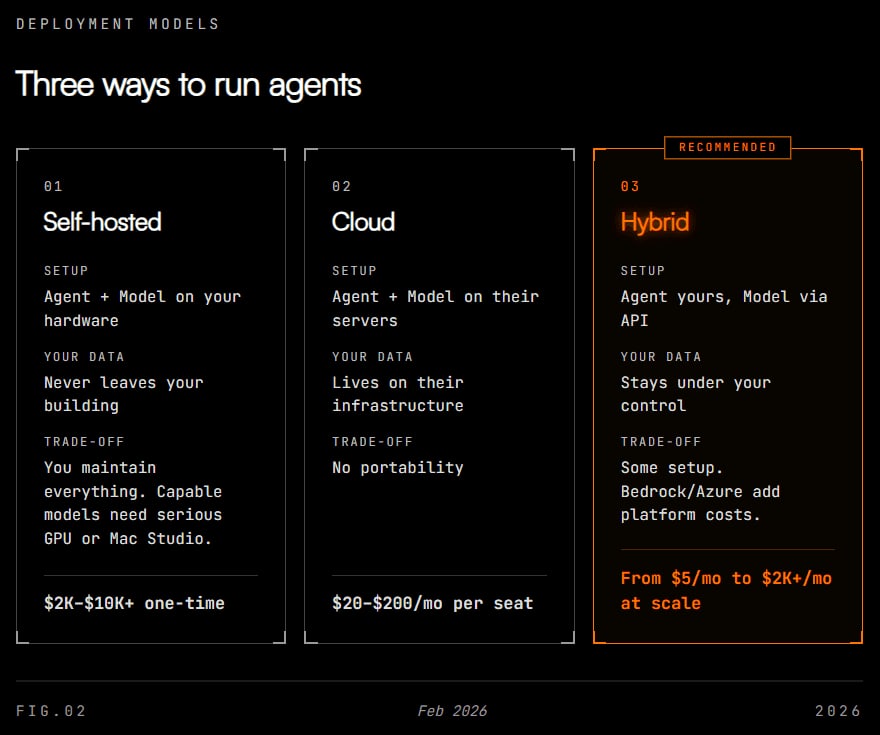
For most businesses I see a hybrid model being suitable.
Run it yourself. The agent and the AI model both live on your own hardware. A Mac Mini in the office, a server in your closet. A Mac Mini with 64GB will run smaller models for around $2,000. But if you want to run capable 70B+ parameter models, you're looking at a Mac Studio or a dual-GPU setup in the $5,000 - $10,000 range. Your data never leaves your building. Nobody else sees your client information, your processes, your communications.
The trade-off: you need someone technical to set it up and maintain it. The AI models you can run locally are slower and less capable than the big cloud models, around 10–15 tokens per second versus 50+ in the cloud. And if something breaks at 2am, that's your problem. Security researchers have already flagged real risks with with these self-hosted setups. Full control means full responsibility.
There's one related alternative to this approach, you can run the agent locally, but use cloud based models for the intelligence. One method which can run this way is the aforementioned open-source project OpenClaw. People are running full agent setups on Mac Minis that cost less than a month of a junior hire.
Use a platform. OpenAI, Anthropic, Google, Microsoft. Sign up, connect your tools, start using it. Best AI models in the world, zero technical setup, works out of the box with software you already pay for. Microsoft's Copilot is weaving intelligence across every Office app. The most practical solution currently is Anthropic's Claude Cowork.
The trade-off here though is that every conversation, every preference and every learned behaviour lives on their servers. Your client data passes through their infrastructure. And the problem is that experience is not portable. There is currently no way to export your accumulated knowledge. If you switch platforms, you start from zero. More on this in a minute.
Hybrid. This is probably where most businesses should land. The above-mentioned OpenClaw setup can be run in a hybrid fashion, but it's hardly an enterprise solution as of February 2026. Another way is to run your agent on your own hosted infrastructure or a cheap cloud server ($5/month handles most use cases), but connect it to the best AI models via API when it needs to do complex thinking. Your data stays under your control. You get access to the cutting edge intelligence only when you need it.
For larger businesses, enterprise options like AWS Bedrock and Microsoft Azure offer managed AI infrastructure with data residency controls, encryption, and compliance certifications. You get sovereignty without running your own hardware, but you're adding platform costs on top of per-token API pricing, which can run into the thousands per month at scale. This will be where most businesses land I think.
Routine tasks get handled by smaller, local models. Complex reasoning gets routed to the best available cloud model. You pay per use, not per month, and your data stays where you can see it. It makes the most sense.
Context ownership is important
I've seen a lot of people espousing the benefits of agents, or showing how they one-shot complex problems and make money for them whilst they sleep. I think these types of posts are missing the most important thing here. And that's whether you have ownership over your data or not.
Because every day you use an agent, it learns more about your business. How you communicate. Who your clients are. What your processes look like. What you prioritise. That accumulated knowledge is exactly what makes the agent valuable for you. It gets better at executing tasks the more you use it. That's a fact.
But as of February 2026, none of the major platforms let you take it with you. Your hard earned contextual information is stuck with them, probably intentionally, and moving platforms is hard. Stickiness is what they want, but in order to gain the most benefit with agents, you need that data to be yours.
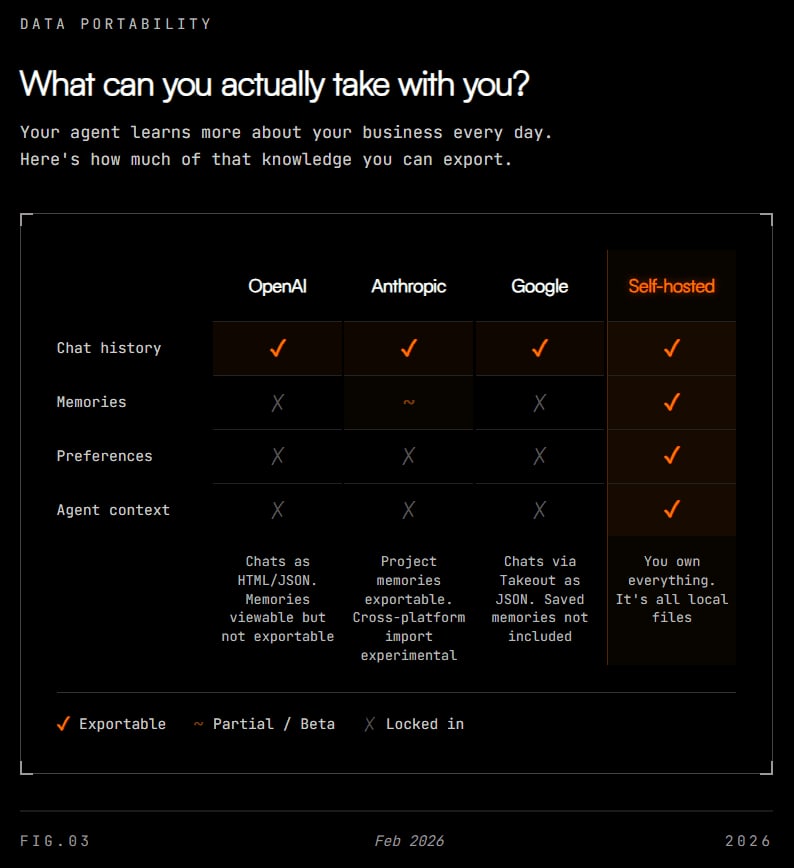
Right now OpenAI lets you download your chat history as an HTML file. Not your memories, not your preferences, not what the agent has learned about you. Anthropic is the only platform experimenting with memory export and it's still in beta. Google gives you a generic data dump via Takeout with nothing AI-specific. Microsoft has no export path at all.
And what happens when as a business you need an agent per staff member. How do you take advantage of that rapid context sharing? When it's your data, it's easier. With say, an OpenClaw setup, you're able to have multiple agents utilising a shared memory system, where they can all summarise and share learnings from their users to inform conversations they have with others. Good luck doing that with ChatGPT today.
It's promising though to see that the infrastructure underneath is getting standardised. Anthropic's Model Context Protocol for tool connections has 97 million monthly downloads. Google's Agent2Agent protocol handles agent-to-agent communication. Both have been donated to the Linux Foundation. OpenAI, Anthropic, Google, Microsoft, and AWS are all founding members of the new Agentic AI Foundation.
So whilst the plumbing is becoming interoperable, the part that makes your agent yours is still completely locked in.
This isn't a reason to avoid agents. The value is too clear for that. But it is a reason to choose carefully, understand where your data lives, and start thinking about portability before the switching costs get too high. As mentioned, tools like OpenClaw offer a compelling alternative for complete ownership, and no doubt within months this article will be out of date and the major labs might offer something similar.
What this means for you
You can start adopting agents now for your business. And it's clear from my testing that those that move first will have a compounding advantage because their agents will have months or years of learned context that new adopters won't.
Careful though, moving fast can mean moving recklessly and things can go very wrong.
You should start with one or two specific, high-value automations. The ones where you already know someone is spending hours on repetitive work. Timesheets, onboarding, reporting, email triage. Pick the thing that hurts the most.
Then choose a deployment model that matches your data needs. If for example you handle client medical records, financial data, legal documents, think hybrid or self-hosted. But if you're a marketing agency with less regulated data, a cloud platform might be the fastest path to value.
Lastly, pay attention to where your agent data lives because the decisions you make in the next twelve months will determine how locked in you are for the future. I'm betting on portability winning the race.
To sum it up, agents act as employees, not a search box. The technology is ready to have a real impact on your business now. The skill isn't knowing how the technology works, it's recognising what processes and work can be automated away.